DPR Format in Excel Free Download for Construction Site
Download DPR Format in Excel for construction site reporting. Track daily work progress, manpower, material, machinery, safety and delays easily.
 Suraj Manikpuri
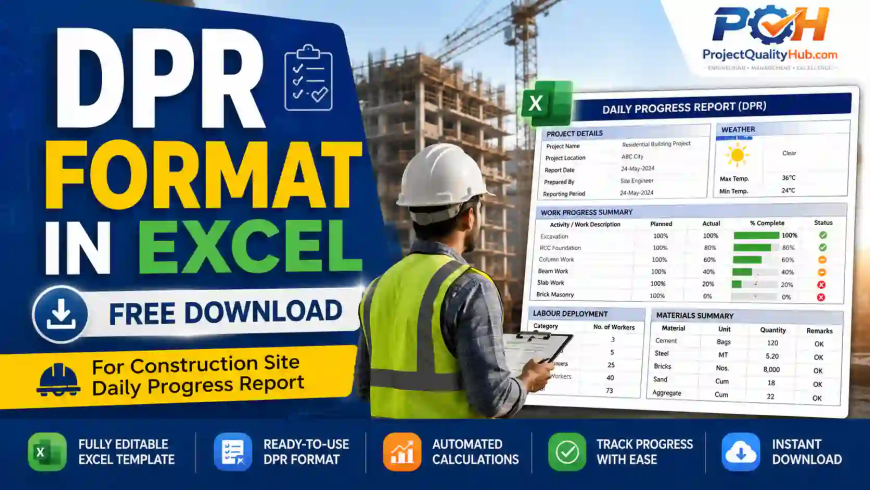
A DPR Format in Excel for construction site is a ready-to-use daily progress report template used to record work progress, manpower, machinery, material consumption, safety observations, site issues, weather conditions, and next-day planning. It helps site engineers, contractors, project managers, and clients track daily construction activities clearly and professionally.
At every construction site, one common question comes at the end of the day:
“What was Actual progress on the site today...Aaj site par actual progress kitna hua?”
If the answer is not recorded properly, problems start later. The client asks for progress proof, the contractor claims extra work, the project manager asks for delay reasons, and the billing team needs quantity details.
This is where a DPR Format in Excel Free Download for Construction Site becomes extremely useful.
A good DPR is not just a report. It is a daily record of site reality. It shows what work was planned, what was actually completed, how many workers were deployed, which machines were used, what materials were consumed, and what problems affected progress.
In this article, you will learn what a DPR format is, why Excel is one of the best formats for construction site reporting, what details must be included, how to fill it properly, common mistakes to avoid, and how site engineers can use it for better project control.
What is DPR Format in Excel?
DPR stands for Daily Progress Report. It is a daily site report prepared to record the actual progress of construction work.
A DPR Format in Excel is an editable spreadsheet template where site engineers, supervisors, contractors, or project coordinators can enter daily site details in a structured manner.
Usually, a construction DPR includes:
- Project name
- Client name
- Contractor name
- Date of report
- Weather condition
- Work planned for the day
- Actual work completed
- Manpower deployment
- Machinery and equipment used
- Material received and consumed
- Site issues and delays
- Safety observations
- Inspection details
- Next-day work plan
- Prepared by and checked by details
In simple words, DPR is the daily health report of a construction project.
Why DPR Format is Important at Construction Site
Many small contractors and beginner engineers prepare DPR casually in WhatsApp messages or rough notebooks. That may work for one or two days, but it creates serious problems in long-duration projects.
A proper DPR format helps in:
| Requirement | How DPR Helps |
|---|---|
| Progress tracking | Shows daily actual work completed |
| Delay analysis | Records reasons like rain, material shortage, drawing hold, manpower shortage |
| Billing support | Provides quantity and work execution record |
| Client reporting | Gives professional daily updates |
| Contractor management | Tracks manpower, productivity and work output |
| Dispute control | Works as evidence during claims and delay discussions |
| Planning | Helps prepare next-day and weekly work plans |
| Safety monitoring | Records unsafe acts, toolbox talks and incidents |
For example, if shuttering work was delayed due to non-availability of drawings, the DPR becomes documentary evidence. Later, when delay responsibility is discussed, this record helps.
Site pe memory se kaam nahi chalta. Documentation is protection.
Download Ready to Use DPR Format in Excel for Construction site

What Should Be Included in a Construction DPR Format?
A professional DPR should not be overloaded, but it must capture all important site data.
Below are the essential sections.
1. Project Information
This is the basic identity section of the DPR.
Include:
- Project name
- Location
- Client name
- Consultant name
- Contractor name
- Report date
- DPR number
- Reporting period
- Prepared by
- Checked by
This section helps in proper documentation and future reference.
2. Weather Condition
Weather affects construction productivity, especially in civil work.
Include:
- Clear
- Cloudy
- Rainy
- Heavy rain
- Extreme heat
- Strong wind
- Work stopped due to weather
Example:
| Weather | Impact on Work |
| Heavy rain | Excavation and concreting delayed |
| High temperature | Work slowed during afternoon |
| Strong wind | Crane lifting activity stopped |
This section is very useful for delay justification.
3. Manpower Deployment
Manpower details are one of the most important parts of DPR.
Include category-wise manpower:
| Category | Nos. |
| Site Engineer | 1 |
| Supervisor | 2 |
| Mason | 8 |
| Helper | 12 |
| Bar Bender | 6 |
| Carpenter | 5 |
| Electrician | 2 |
| Safety Supervisor | 1 |
This helps management understand whether work output is matching manpower deployment.
If 40 workers are deployed and output is very low, the project manager can immediately identify productivity issues.
4. Machinery and Equipment Used
Construction work depends heavily on machinery. DPR should record which machines were available and working.
Include:
- Excavator
- Hydra crane
- Transit mixer
- Concrete pump
- Welding machine
- Plate compactor
- Dumper
- Tower crane
- Bar cutting machine
- Bar bending machine
Example:
| Equipment | Quantity | Working Hours | Status |
| Excavator | 1 | 7 hrs | Working |
| Hydra Crane | 1 | 5 hrs | Working |
| Concrete Mixer | 1 | 3 hrs | Working |
| Plate Compactor | 1 | 0 hrs | Not used |
This helps track equipment utilization and idle time.
5. Material Received and Consumed
Material tracking is important for cost control and reconciliation.
Include:
| Material | Received Today | Consumed Today | Balance |
| Cement | 100 bags | 75 bags | 25 bags |
| Steel | 5 MT | 2 MT | 3 MT |
| Sand | 20 cum | 12 cum | 8 cum |
| Aggregate | 25 cum | 18 cum | 7 cum |
This is useful for store coordination and billing verification.
6. Work Planned vs Actual Work Done
This is the heart of DPR.
A good DPR must clearly show:
- What was planned
- What was completed
- What is pending
- Reason for shortfall
Example:
| Activity | Planned Quantity | Actual Quantity | Status | Remarks |
| Excavation for footing | 50 cum | 42 cum | In Progress | Rain affected work |
| PCC work | 20 cum | 20 cum | Completed | Checked by engineer |
| Rebar cutting | 2 MT | 1.5 MT | In Progress | Balance tomorrow |
| Shuttering work | 100 sqm | 80 sqm | In Progress | Manpower shortage |
This format gives a clear picture to the project manager.
7. Inspection and Quality Checks
DPR should also mention major quality checks carried out during the day.
Include:
- Layout checking
- Excavation level checking
- Reinforcement inspection
- Shuttering inspection
- Concrete slump test
- Cube casting
- Welding inspection
- Painting inspection
- Material inspection
Example:
| Inspection Activity | Status | Remarks |
| Reinforcement checking | Completed | Approved before concreting |
| Slump test | Completed | Result within limit |
| Cube casting | Done | 6 cubes cast |
| Shuttering alignment | Pending | To be checked tomorrow |
This helps quality engineers and site engineers maintain proper records.
8. Safety Observations
Safety reporting should not be ignored in DPR.
Include:
- Toolbox talk conducted or not
- PPE compliance
- Unsafe act observed
- Near miss
- Accident or incident
- Work permit status
- Housekeeping condition
Example:
| Safety Point | Status |
| Toolbox talk conducted | Yes |
| PPE compliance | 90% |
| Near miss reported | No |
| Work permit available | Yes |
| Housekeeping | Needs improvement |
This section is very useful in industrial, infrastructure and high-risk construction projects.
Step-by-Step Process to Fill DPR Format in Excel
Filling DPR should be simple and disciplined.
Step 1: Fill Basic Project Details
Enter project name, location, date, contractor and prepared-by details.
Step 2: Record Weather Condition
Mention actual site weather and its impact, if any.
Step 3: Enter Manpower Details
Add category-wise manpower. Do not just write “total manpower 50.” Category-wise data is more useful.
Step 4: Add Machinery Details
Record each machine, quantity, working hours and status.
Step 5: Mention Work Progress
Write planned vs actual progress clearly. Add quantity wherever possible.
Step 6: Record Material Received and Consumed
Mention major construction materials used during the day.
Step 7: Add Issues and Delays
Clearly mention delay reasons like:
- Drawing not available
- Material shortage
- Rain
- Client hold
- Equipment breakdown
- Manpower shortage
- Access problem
- Safety clearance pending
Step 8: Add Next-Day Plan
Mention tomorrow’s planned work. This helps the team start the next day with clarity.
Step 9: Review and Submit
The DPR should be checked by the site engineer or project in-charge before submission.
Practical Example of Construction Site DPR
Let us take a simple example.
A building foundation work is going on. Today’s planned activities were excavation, PCC and reinforcement cutting.
Sample DPR Entry
| Description | Details |
| Project | Residential Building Construction |
| Date | 02 June 2026 |
| Weather | Cloudy with light rain |
| Main Work | Excavation, PCC and reinforcement cutting |
| Total Manpower | 32 |
| Major Equipment | Excavator, concrete mixer, bar cutting machine |
| Delay Reason | Rain for 2 hours |
| Safety Status | No accident, toolbox talk conducted |
| Next-Day Plan | Complete balance excavation and start footing reinforcement |
Work Progress Table
| Activity | Planned | Actual | Status | Remarks |
| Excavation | 60 cum | 48 cum | In Progress | Rain affected work |
| PCC | 15 cum | 15 cum | Completed | Cube samples taken |
| Rebar Cutting | 2 MT | 1.8 MT | In Progress | Balance tomorrow |
This type of DPR is simple, clear and useful.
Real Industry Scenario: Why DPR Saved a Contractor Claim
In one industrial project, a contractor was blamed for delay in equipment foundation work. The client said the contractor failed to deploy enough manpower.
But the DPR records showed a different picture.
For 12 days, the contractor had recorded:
- Drawing approval pending
- Excavation area not released
- Rainwater accumulation in foundation pit
- Client clearance awaited
- Manpower available but work front not available
Because the DPR was maintained daily with remarks, the contractor could justify that the delay was not fully due to manpower shortage.
This is why DPR is not only a report. It is a project record and delay evidence.
Advantages of Using DPR Format in Excel
A well-designed Excel DPR format gives many practical benefits.
1. Better Daily Control
You can quickly compare planned vs actual progress.
2. Easy Manpower Tracking
Category-wise manpower can be maintained and reviewed.
3. Better Client Communication
Instead of giving verbal updates, you can send a professional report.
4. Useful for Billing
Work quantity records support RA bills and contractor bills.
5. Delay Documentation
Daily remarks help justify delay causes.
6. Better Planning
Next-day work planning becomes easier.
7. Professional Reporting
A structured DPR improves the image of the site team.
Common Mistakes While Preparing DPR
Many DPRs fail because they are filled casually.
Avoid these mistakes:
- Writing only “work in progress” without quantity
- Not mentioning delay reason
- Not recording manpower category-wise
- Ignoring machinery idle time
- Not mentioning material shortage
- Not recording safety observations
- Submitting DPR after many days
- Copy-pasting the same remarks daily
- Not attaching photos where required
- Not getting DPR checked by responsible person
A DPR should show actual site condition, not just formal reporting.
Expert Tips to Make DPR More Professional
Based on real site reporting experience, here are some practical tips.
Use Quantity Wherever Possible
Instead of writing:
“Excavation work done”
Write:
“Excavation completed: 42 cum against planned 50 cum”
Mention Reasons Clearly
Instead of writing:
“Work delayed”
Write:
“Work delayed for 2 hours due to rain and water accumulation in excavated area”
Use Standard Activity Names
Do not change activity names daily. Use consistent names like:
- Excavation
- PCC
- Reinforcement
- Shuttering
- Concreting
- Brickwork
- Plastering
- Painting
- Cable laying
- Equipment erection
Add Photo Reference
Add a column like:
“Photo No. / Attachment Reference”
This helps during client review.
Submit DPR Same Day
DPR prepared after 3–4 days is usually inaccurate. Same-day reporting is best.
DPR Format Checklist for Site Engineers
Before submitting DPR, check these points:
- Project name and date filled correctly
- Weather condition mentioned
- Manpower details updated
- Machinery details updated
- Planned vs actual work clearly shown
- Quantity entered wherever applicable
- Delay reason mentioned
- Material received and consumed recorded
- Safety observations added
- Quality inspection details included
- Next-day plan mentioned
- Report checked and signed
This checklist can reduce reporting errors significantly.
How DPR Helps Project Managers
For project managers, DPR is not just paperwork. It is a control tool.
A project manager can use DPR to check:
- Whether the contractor deployed enough manpower
- Whether equipment was idle
- Whether materials reached site on time
- Whether work fronts were available
- Whether safety compliance was maintained
- Whether delay reasons are genuine
- Whether progress matches schedule
If reviewed properly, DPR can become a daily dashboard for project control.
How DPR Helps Contractors
Contractors can also benefit from DPR.
It helps them:
- Prove work completed
- Support billing
- Record hindrances
- Justify delay due to client-side issues
- Track labour productivity
- Avoid disputes
- Maintain professional communication
Many contractors lose money because they do not maintain proper daily records. DPR protects their work.
FAQs on DPR Format in Excel for Construction Site
1. What is DPR format in construction?
DPR format in construction is a daily progress report template used to record site work progress, manpower, machinery, material consumption, safety observations, quality checks, delays and next-day planning.
2. What is the full form of DPR?
The full form of DPR is Daily Progress Report. In construction, it is prepared daily to track actual work completed at site.
3. Can I use DPR Format in Excel for civil work?
Yes, Excel DPR format is very useful for civil work such as excavation, PCC, RCC, reinforcement, shuttering, concreting, brickwork, plastering and finishing activities.
4. Who prepares DPR at construction site?
Generally, DPR is prepared by the site engineer, supervisor, planning engineer or contractor representative. It is usually checked by the project manager or client representative.
5. What should be included in daily progress report?
A daily progress report should include project details, date, weather, work planned, actual progress, manpower, machinery, material, safety observations, quality checks, site issues and next-day plan.
6. Is Excel better than Word for DPR?
Excel is better for daily progress tracking because it allows tables, calculations, quantity tracking and easy editing. Word is better for formal narrative reports.
7. Why is DPR important for contractors?
DPR helps contractors prove daily work progress, record delay reasons, support billing and avoid disputes with clients.
8. Can DPR be used for billing?
Yes, DPR can support billing by recording daily work quantities, manpower deployment and completed activities. However, billing should also be supported by measurement sheets and approved documents.
9. What is the difference between DPR and progress report?
DPR is a daily report, while a progress report may be daily, weekly or monthly. DPR gives detailed day-wise site progress.
10. Should DPR be submitted daily?
Yes, DPR should be prepared and submitted daily because delayed reporting may lead to wrong data, missed issues and poor project tracking.
Read Also