How to Download Primavera P6 for Free in 2026 (Step-by-Step Guide for Engineers & Students)
Learn how to download Primavera P6 for free using the official Oracle method. Step-by-step guide for engineers and students with screenshots and tips.
 Suraj Manikpuri

Introduction
If you are a civil engineer, mechanical engineer, planning engineer, or project management student, you’ve probably heard about Primavera P6.
It is one of the most powerful project planning and scheduling software used in industries like:
-
Construction
-
Oil & Gas
-
Steel Plants
-
Infrastructure Projects
-
Manufacturing
In fact, many large organizations require Primavera skills for planning roles.
But here’s the common problem most beginners face:
“Primavera P6 is expensive… so how can I download Primavera P6 for free?”
Good news: You actually can access Primavera P6 legally without paying initially.
In this guide, I’ll explain real and safe methods to download Primavera P6 for free, along with practical tips from real industry experience.
What is Primavera P6?
Primavera P6 is a professional project scheduling and management software developed by Oracle.
It helps engineers and project managers to:
-
Plan project timelines
-
Allocate resources
-
Track project progress
-
Manage delays
-
Control project cost
For example, in a steel plant project, Primavera is used to plan activities like:
-
Equipment erection
-
Civil foundation work
-
Mechanical installation
-
Commissioning schedule
One single project schedule can have thousands of activities, and Primavera handles it smoothly.
Can You Download Primavera P6 for Free?
Yes — but only through legal methods.
There are mainly three ways to use Primavera P6 for free:
-
Free Trial from Oracle
-
Student / Training Institute Access
-
Online Primavera Cloud Practice
Let’s look at each option.
Step-by-Step Guide: How to Download Primavera P6 for Free
Below is the exact process based on the Oracle website interface shown in the screenshots.
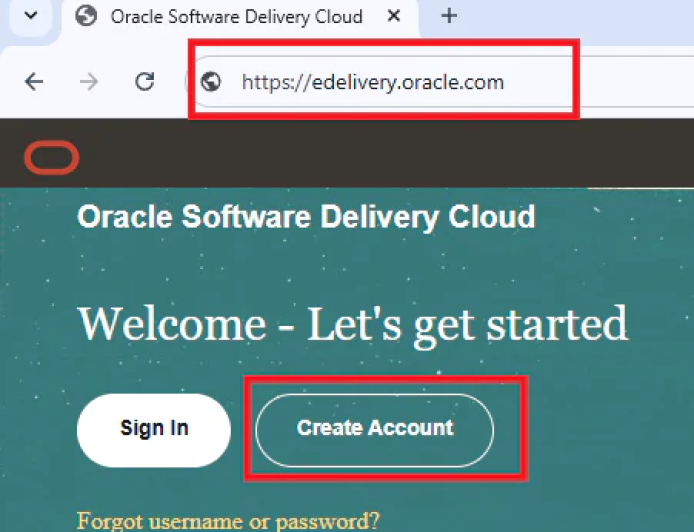
Step 1: Open Oracle Software Delivery Cloud
Go to the official Oracle download portal:
You will see the Oracle Software Delivery Cloud homepage with options like:
-
Sign In
-
Create Account
If you already have an Oracle account, you can directly sign in.
Otherwise, create a new account.
Step 2: Create an Oracle Account
Click Create Account.
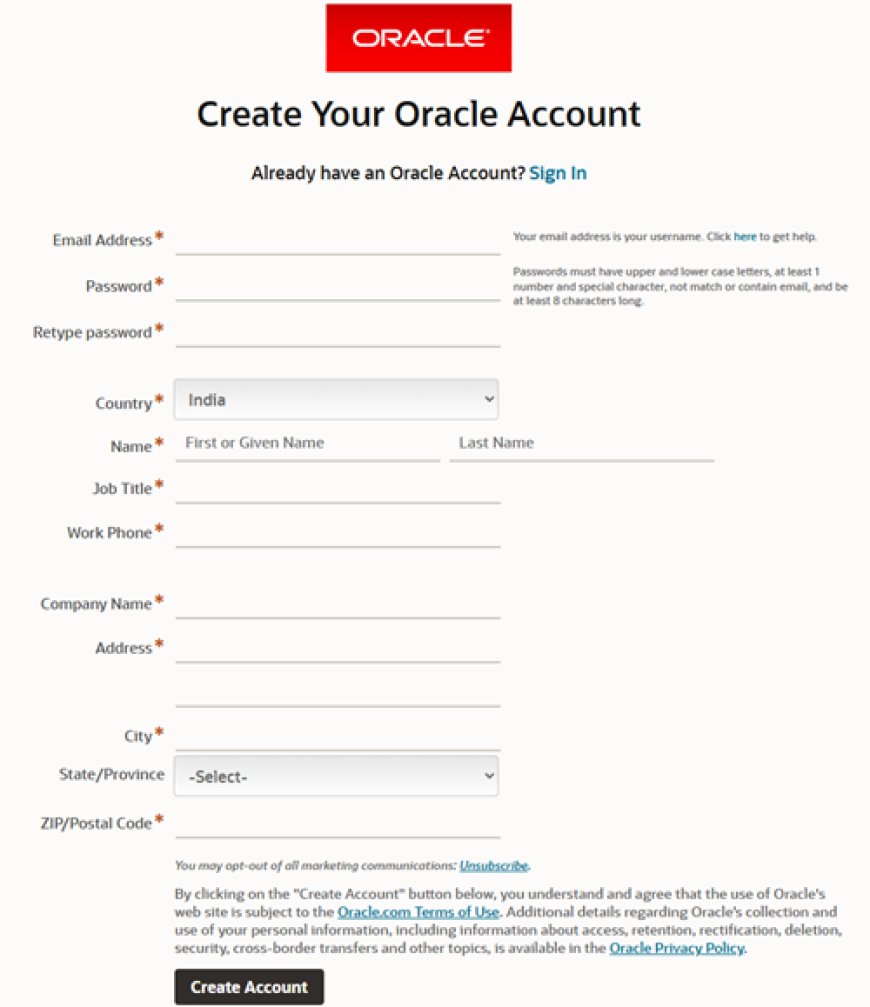
You will need to fill details such as:
-
Email address
-
Password
-
Country
-
Name
-
Job title
-
Company name
-
Phone number
After filling the form, click Create Account.
Oracle will send a verification email.
Open the email and click Verify Email Address.
Once verified, your Oracle account will be activated.
Step 3: Sign In to Oracle Software Delivery
Return to:
Click Sign In and verify your credentials and log in using your Oracle credentials.
After login, you will see the Software Delivery search page.
Step 4: Search for Primavera P6
In the search bar, type:
Primavera P6 Professional
Then click Search.
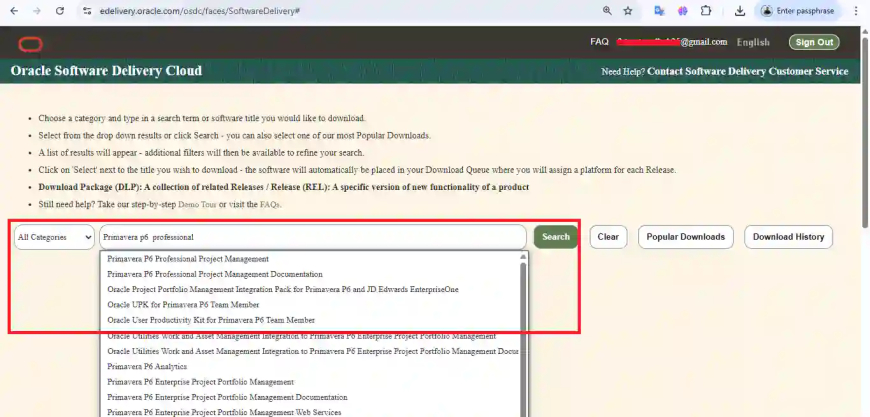
A dropdown list will show several results like:
-
Primavera P6 Professional Project Management
-
Primavera P6 Documentation
-
Primavera P6 Enterprise Project Portfolio Management
For most learners, choose:
Primavera P6 Professional Project Management
Step 5: Add Primavera P6 to Download Queue
Click Select next to the Primavera P6 package.
The software will be added to your Download Queue.
Then click Continue.
On the next screen, choose the platform:
Microsoft Windows x64 (64-bit)
Step 6: Accept the License Agreement
Oracle will display the software license agreement.
Scroll down and check the box:
✔ I reviewed and accept the Oracle License Agreement
Then click Continue.
Step 7: Download Primavera P6 Installation Files
After accepting the license, Oracle will show the download page.
You will see multiple files such as:
-
Primavera P6 Professional Applications
-
Primavera P6 Integration API
-
Primavera P6 Database Setup
-
Primavera P6 Documentation
Total download size is approximately 300 MB.
Click Download to download all files.
Installing Primavera P6 After Download
After downloading:
-
Extract the ZIP files
-
Open the extracted folder
-
Run setup.exe
-
Follow the installation wizard
-
Choose Standalone installation
-
Select SQLite database for simple setup
Within a few minutes, Primavera P6 will be installed on your system.
Real Practical Example
Let’s say you are planning a small industrial project.
Example schedule:
| Activity | Duration |
|---|---|
| Project Planning | 5 Days |
| Foundation Work | 20 Days |
| Equipment Erection | 25 Days |
| Testing | 10 Days |
Primavera P6 can automatically:
-
Calculate project completion date
-
Identify Critical Path
-
Track delays
This is why large organizations rely heavily on Primavera.
Advantages of Primavera P6
Industry Standard Software
Used globally in construction and infrastructure projects.
Handles Large Projects
Can manage thousands of activities efficiently.
Advanced Scheduling
Provides powerful critical path and resource analysis.
Career Opportunities
Learning Primavera can help you become:
-
Planning Engineer
-
Project Scheduler
-
Project Control Engineer
Disadvantages of Primavera P6
Expensive License
Commercial licenses can be costly for individuals.
Learning Curve
Beginners need some time to understand:
-
WBS
-
Activity relationships
-
Resource allocation
Installation Complexity
Database configuration may confuse new users.
Common Mistakes When Downloading Primavera
Downloading Pirated Software
Many websites offer cracked Primavera versions.
These can contain:
-
Malware
-
Viruses
-
Corrupted installation files
Always use the official Oracle source.
Selecting the Wrong Version
Some users download:
-
Primavera Analytics
-
Primavera EPPM
These are enterprise solutions.
For learning, always select:
Primavera P6 Professional Project Management
Ignoring System Requirements
Recommended system:
-
Windows 10 / 11
-
8 GB RAM
-
10 GB free storage
Expert Tips for Learning Primavera Faster
Here are some practical tips.
Start with Simple Projects
Practice using small examples like:
-
House construction
-
Equipment installation schedule
Understand Scheduling Logic
Focus on concepts like:
-
FS relationships
-
SS relationships
-
Lag and Lead
Practice Critical Path Analysis
Critical path is the heart of project scheduling.
Use Daily Practice
Even 30 minutes of practice daily can build strong Primavera skills.
Conclusion
If you are serious about a career in project planning or project management, learning Primavera P6 is a valuable skill.
The good news is that engineers and students can download Primavera P6 for free using the official Oracle trial version.
By following the step-by-step process explained above, you can easily download and install Primavera P6 from the Oracle Software Delivery Cloud.
Once installed, start practicing with small projects and gradually explore advanced features.
With consistent learning, Primavera can open doors to exciting careers like Planning Engineer, Project Scheduler, and Project Control Specialist.
FAQs
1. Is Primavera P6 free to download?
Primavera P6 is not permanently free, but Oracle provides a trial version that can be downloaded for evaluation and learning purposes.
2. How long is the Primavera P6 trial?
The trial availability depends on Oracle licensing terms but is typically used for short-term evaluation and learning.
3. Can students learn Primavera P6 for free?
Yes. Students can use the trial version or training institute licenses to learn Primavera P6.
4. Is Primavera P6 better than MS Project?
Primavera is better suited for large and complex projects, while MS Project is commonly used for smaller projects.
5. Do companies really use Primavera P6?
Yes. Primavera P6 is widely used in industries like:
-
Construction
-
Infrastructure
-
Oil & Gas
-
Steel plants
-
Power projects
It is considered a global standard for project scheduling software.