DPR Format in Word Free Download for Site Engineers
Download DPR Format in Word for site engineers. Learn how to write a professional daily site report for client submission, approval, and records.
 Suraj Manikpuri
DPR Format in Word Free Download: 9 Site Reporting Mistakes It Helps Engineers Avoid
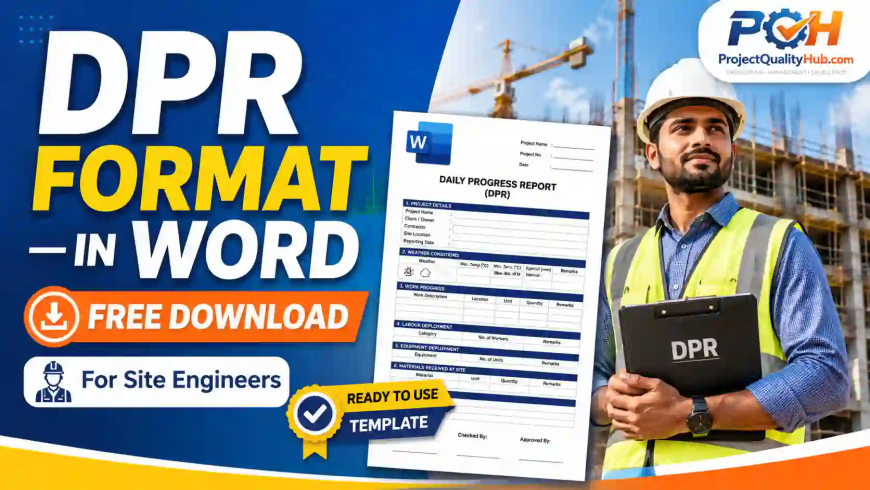
A DPR Format in Word is a printable and editable Daily Progress Report document used by site engineers to submit daily work updates in a professional format. It is best for client submission, signatures, PDF sharing, approval records, delay remarks, safety notes, and formal site documentation.
Many site engineers do good work at site but fail to present it properly in records.
Work is completed.
Manpower is available.
Machines are used.
Issues are discussed verbally.
But when the project manager or client asks, “Please send yesterday’s DPR,” the report is either missing, unclear, or written casually on WhatsApp.
That is where a proper DPR Format in Word becomes useful.
Excel is excellent for tracking numbers, quantities, and progress data. But Word is better when you need a clean, formal, signature-friendly report that can be submitted to clients, consultants, contractors, and management.
A Word DPR gives your site report a professional look. It also helps you explain daily progress, site issues, instructions, constraints, and next-day planning in a readable format.
In this guide, you will learn how to use a DPR Word format properly, what makes it different from Excel DPR, how site engineers should write remarks, what mistakes to avoid, and how to make your DPR useful for approval, billing support, and project records.
What is DPR Format in Word?
A DPR Format in Word is an editable document template used to write and submit daily site progress in a formal report format. It is usually prepared by site engineers, supervisors, contractors, project coordinators, or planning teams. Unlike Excel, which is more suitable for calculations and tabular tracking, Word is useful when the report needs proper explanation, remarks, signatures, and professional presentation.
A Word DPR is commonly used for:
-
Daily submission to client or consultant
-
Internal reporting to project manager
-
Contractor progress record
-
Site visit record
-
Delay and hindrance notes
-
Safety and quality observations
-
PDF submission by email or WhatsApp
-
Signed project documentation
Simple samjho:
Excel DPR is strong for data. Word DPR is strong for official communication.
DPR Format in Word Free Download for Site Engineers

Why Site Engineers Still Need DPR in Word
Many engineers think that Excel is enough for DPR. But in real site conditions, Word format has its own importance.
A client may not always want a complex spreadsheet. Sometimes they need a clean daily report that explains what happened at site in simple words.
Word DPR is useful because it can be read quickly, printed easily, signed physically, converted into PDF, and attached with photos or supporting documents.
For site engineers, Word DPR helps in three major ways:
-
It improves the professional presentation of site progress.
-
It creates a clear written record of daily site conditions.
-
It reduces confusion during billing, delay discussion, and client review.
When the report is properly written, it becomes more than paperwork. It becomes proof of daily site activity.
When Should You Use Word DPR Instead of Excel DPR?
Use Word DPR when your reporting requirement is more formal and explanation-based.
| Situation | Better Format |
|---|---|
| Client wants signed daily report | Word |
| Report needs explanation and remarks | Word |
| You need to submit DPR as PDF | Word |
| You want professional presentation | Word |
| Daily report includes many observations | Word |
| You need automatic quantity calculation | Excel |
| You need manpower productivity analysis | Excel |
| You need dashboard or summary chart | Excel |
| You need monthly progress compilation | Excel |
For best project control, use both formats smartly.
Use Word DPR for formal daily submission.
Use Excel DPR for quantity tracking and progress analysis.
What Makes a Good DPR Word Format?
A good DPR Word format should be simple, clean, and site-friendly.
It should not look like a complicated textbook. Site engineers already work under pressure, so the report should be easy to fill within 10–15 minutes.
A professional Word DPR should have:
-
Clear project header
-
Date and reporting period
-
Site location or work area
-
Work summary
-
Manpower summary
-
Machinery summary
-
Important materials used or received
-
Site instructions
-
Hindrances or delays
-
Safety observations
-
Quality observations
-
Next day work plan
-
Signature section
The most important point is clarity.
A good DPR should answer these questions:
-
What work was done today?
-
Where was the work done?
-
Who was involved?
-
What issue affected work?
-
What action is required tomorrow?
-
Who prepared and checked the report?
9 Reporting Mistakes a DPR Format in Word Helps You Avoid
A well-designed Word DPR format helps engineers avoid many common reporting mistakes.
1. Submitting Casual WhatsApp Updates Instead of Formal Reports
WhatsApp updates are useful for quick communication, but they are not proper project records.
A message like “slab work completed” may be fine for immediate update, but it is weak for documentation.
A Word DPR gives a formal structure with date, project name, work details, remarks, and signature.
2. Writing Progress Without Location
Many reports mention work progress but do not mention location.
Weak reporting:
“Plaster work completed.”
Better reporting:
“Internal plaster completed in Room No. 102 and 103, First Floor, Block A.”
Location makes the report traceable.
3. Missing Client or Consultant Instructions
At site, many instructions are given verbally.
If they are not recorded, confusion may happen later.
Example:
“Consultant instructed to hold concreting until reinforcement spacing correction is completed.”
Such instructions should be recorded in DPR remarks.
4. Not Recording Hindrances Properly
If work is stopped due to drawing hold, material shortage, access issue, rain, permit delay, or front unavailability, it should be mentioned clearly.
Do not write emotionally.
Avoid:
“Client delayed the work.”
Write professionally:
“Work could not be started due to non-availability of approved drawing for foundation F3.”
This is factual and useful.
5. No Signature or Approval Space
A DPR without signature looks incomplete in many projects.
A Word format should have space for:
-
Prepared by
-
Checked by
-
Contractor representative
-
Client or consultant representative
-
Project manager
This makes the DPR stronger as a record.
6. Mixing Too Much Data in One Report
Some engineers try to include every small detail in one DPR.
This makes the report confusing.
Word DPR should focus on clear reporting. Detailed quantity calculations, labour productivity, and monthly summaries can be kept in Excel.
7. Not Converting Final DPR to PDF
Word files can be edited easily.
For official submission, prepare DPR in Word, review it, then convert it to PDF before sending.
This protects the final submitted version.
8. Copy-Pasting Yesterday’s Report
This is a common site mistake.
If yesterday’s remarks are copied again and again, the DPR loses value.
Every day’s report should reflect actual site conditions.
9. Writing Vague Remarks
Avoid remarks like:
“Work going on.”
“Progress slow.”
“Material issue.”
“Manpower less.”
Use specific remarks:
“Cable tray erection completed from Grid B2 to B5. Work slowed after 3:00 PM due to non-availability of required fasteners.”
Specific reporting is always better.
How to Fill DPR Format in Word Professionally
Follow this simple workflow.
Step 1: Fill Project Header
Enter project name, client, contractor, location, date, and DPR number.
Do this carefully. Wrong date or project name creates confusion later.
Step 2: Write Short Daily Summary
Start with a 3–4 line summary of the day.
Example:
“Today, reinforcement binding for footing F1 and F2 was completed. Shuttering work for F1 started after QA/QC clearance. Concrete pouring was not taken up due to pending client inspection.”
This gives a quick overview.
Step 3: Add Work Details Area-Wise
Mention work progress by location or activity.
Example:
| Area | Activity | Status | Remarks |
|---|---|---|---|
| Block A | Column shuttering | In progress | C1 to C4 completed |
| Block B | Brick masonry | Completed | Up to sill level |
| Pump Room | Cable tray work | In progress | 18 m completed |
This is more useful than a long paragraph.
Step 4: Mention Site Instructions
Record important instructions given by client, consultant, project manager, or safety officer.
Example:
“Client representative instructed to provide additional barricading near excavation area before starting next activity.”
Step 5: Add Hindrance Notes
Write the exact reason for delay or stoppage.
Good examples:
-
Work stopped for 2 hours due to heavy rain.
-
Excavation could not start because work front was not released.
-
Erection activity kept on hold due to non-availability of crane permit.
-
Concreting shifted to next day due to pending inspection clearance.
Step 6: Add Safety and Quality Notes
Keep this section short but meaningful.
Example:
“Toolbox talk conducted for work at height. Full body harness compliance checked before starting scaffolding work.”
Or:
“Reinforcement spacing checked as per approved drawing. Minor correction carried out before inspection.”
Step 7: Add Next Day Plan
Do not close DPR without tomorrow’s plan.
Example:
“Next day plan: Complete shuttering for balance columns, obtain client clearance, and start concreting after inspection approval.”
Step 8: Review and Save
Before submission, check:
-
Date
-
Location
-
Quantities
-
Names
-
Remarks
-
Spelling
-
Signature space
Then save the file properly.
Recommended file name:
DPR_ProjectName_Date.docx
Example:
DPR_PumpHouse_02-06-2026.docx
Sample DPR Word Report Writing Example
Below is a practical writing style for a Word DPR.
Project Name
Commercial Building Construction
Date
02 June 2026
Location
Block A, First Floor
Daily Work Summary
Reinforcement binding for slab area A1 was completed. Electrical conduit fixing was also completed before inspection. Client inspection was carried out in the evening. Concrete pouring was shifted to the next day due to non-availability of concrete pump.
Work Progress Details
| Work Area | Activity | Status | Remarks |
|---|---|---|---|
| Slab A1 | Reinforcement binding | Completed | Checked by site engineer |
| Slab A1 | Electrical conduit fixing | Completed | Joint inspection done |
| Slab A1 | Concrete pouring | Pending | Pump not available |
| Staircase area | Shuttering | In progress | Balance work tomorrow |
Manpower Summary
1 site engineer, 2 supervisors, 8 bar benders, 10 helpers, 3 electricians, and 1 safety supervisor were deployed.
Machinery Used
Bar cutting machine, bar bending machine, welding machine, and concrete vibrator were available at site. Concrete pump was not available.
Safety Observation
Toolbox talk was conducted before work. PPE compliance was checked. One unsafe cable joint was observed near slab area and corrected immediately.
Quality Observation
Reinforcement spacing and electrical conduit fixing were checked before client inspection. Minor correction was completed near beam B3.
Hindrance / Delay
Concrete pouring could not be completed due to non-availability of concrete pump.
Next Day Plan
Concrete pouring for slab A1 will be taken up after final clearance and pump arrangement.
This type of DPR is simple, clear, and professional.
Best Uses of DPR Word Format in Construction Projects
A DPR Word format is useful in many site situations.
For Site Engineers
It helps site engineers submit daily progress in a professional way without preparing a new report from zero every day.
For Contractors
It helps contractors maintain proof of daily work, manpower deployment, site instructions, and delay reasons.
For Project Managers
It helps project managers review actual site conditions without depending only on verbal updates.
For Clients and Consultants
It gives a clear daily record of work progress, safety points, quality checks, and pending actions.
For Billing and Claims
It supports billing records, delay justification, and work verification when used along with measurement sheets and approved documents.
Word DPR Submission Checklist
Before sending your DPR, check the following:
-
Project name is correct
-
DPR date is correct
-
Work location is clearly mentioned
-
Daily summary is written
-
Activity-wise progress is updated
-
Hindrance or delay is written factually
-
Safety observation is included
-
Quality observation is included
-
Next day plan is added
-
Prepared by and checked by names are mentioned
-
Signature space is available
-
File is converted to PDF for final submission
-
File name is properly saved
-
Copy is stored in project folder
This checklist helps avoid last-minute reporting mistakes.
DPR Word Format vs Handwritten Site Report
| Point | Word DPR Format | Handwritten Report |
|---|---|---|
| Professional look | High | Low to medium |
| Easy to share | Yes | No |
| Easy to convert to PDF | Yes | No |
| Readability | Good | Depends on handwriting |
| Signature support | Good | Good |
| Long-term record | Easy to store | Difficult |
| Editing before final issue | Easy | Difficult |
| Client submission | Suitable | Less suitable |
| Searchability | Good | Poor |
Handwritten records may work for internal site notes, but for formal reporting, Word DPR is better.
Expert Tips from Site Reporting Experience
Use these practical tips:
-
Keep the report short but complete.
-
Write facts, not opinions.
-
Mention location with activity.
-
Use approved drawing references where required.
-
Add photos separately with date-wise folder.
-
Convert final DPR to PDF before submission.
-
Keep Word file as editable master copy.
-
Do not hide site constraints.
-
Do not exaggerate progress.
-
Maintain one standard format for all contractors.
A professional DPR improves the credibility of the site team.
Conclusion
A DPR Format in Word Free Download is very useful for site engineers who need a clean, professional, and ready-to-submit daily progress report.
It helps you record daily work, site instructions, delays, safety observations, quality points, and next day planning in a formal way.
Excel is useful for calculation and tracking, but Word is better when your DPR needs to be printed, signed, converted to PDF, or submitted to clients and consultants.
If you are working at a construction site, industrial project, maintenance shutdown, or contractor job, start maintaining your DPR in a proper Word format.
Because site work without record can create confusion later, but a well-written DPR protects your work, your team, and your project.
FAQs on DPR Format in Word
1. What is DPR Format in Word?
DPR Format in Word is an editable Daily Progress Report template used to prepare formal daily site reports for construction, industrial, civil, mechanical, and electrical projects.
2. Why should site engineers use Word DPR format?
Site engineers should use Word DPR format because it is easy to edit, print, sign, convert to PDF, and submit formally to clients, consultants, and project managers.
3. Is Word DPR better than Excel DPR?
Word DPR is better for formal reporting, written remarks, signatures, and PDF submission. Excel DPR is better for calculations, quantity tracking, and progress analysis.
4. What should be written in a DPR Word format?
A DPR Word format should include project details, date, site location, daily work summary, manpower, machinery, safety observations, quality observations, hindrances, and next day plan.
5. Can I use DPR Word format for contractor billing?
Yes, DPR Word format can support contractor billing records, but final billing should also be supported by measurement sheets, approved quantities, purchase orders, and client certification.
6. Should DPR be submitted in Word or PDF?
Prepare the DPR in Word for editing, but submit the final version as PDF to avoid unwanted changes after submission.
7. Who checks DPR at site?
Usually, the DPR is checked by the project manager, planning engineer, client representative, consultant, or contractor’s authorized representative, depending on the project system.
8. Can DPR Word format be used for mechanical and electrical work?
Yes, DPR Word format can be used for civil, mechanical, electrical, erection, commissioning, shutdown, and maintenance work.
9. What is the best file name for DPR?
A good file name is DPR_ProjectName_Location_Date. For example, DPR_BlockA_02-06-2026.pdf.
10. How can I make DPR more professional?
Write clear activity location, mention exact hindrance, use factual language, include safety and quality observations, add next day plan, and convert the final report into PDF.
Read Also