OBS (Organizational Breakdown Structure) Explained Simply for Project Engineers
Learn OBS (Organizational Breakdown Structure) with simple examples, steps, and real project insights. Ideal for engineers and beginners.
 Suraj Manikpuri
OBS (Organizational Breakdown Structure) – Simple Guide for Engineers
Introduction
A few years back, during a project review meeting, something interesting happened.
The project was delayed… activities were defined… schedule was ready…
But when management asked:
👉 “Who is responsible for this delay?”
Silence.
No one had a clear answer.
That’s when I realized — the problem was not planning… it was ownership.
And this is exactly where OBS (Organizational Breakdown Structure) comes in.
👉 OBS ensures that every task has a clear responsible person or team.
Let’s understand this in a simple, practical way.
What is OBS (Organizational Breakdown Structure)?
OBS (Organizational Breakdown Structure) is a hierarchical structure that defines who is responsible for what in a project or organization.
In simple words:
👉 OBS answers one critical question:
“Yeh kaam kaun karega?” (Who will do this work?)
It connects:
-
People
-
Roles
-
Departments
-
Responsibilities
Why OBS is Important in Projects
You may have:
✔ Perfect schedule
✔ Detailed WBS
✔ Proper planning
But without OBS:
❌ No accountability
❌ Confusion in responsibility
❌ Delay in decision making
👉 OBS ensures clear ownership — which is critical in large projects.
OBS vs EPS vs WBS (Simple Comparison)
This confusion is very common, so let’s clear it once and for all.
| Structure | Purpose | Example |
|---|---|---|
| EPS | Organize projects | Plant → Project |
| WBS | Break work | Civil → Mechanical |
| OBS | Assign responsibility | Manager → Engineer |
👉 Simple formula:
-
EPS = Where projects are stored
-
WBS = What work is done
-
OBS = Who does the work
Key Features of OBS
1. Hierarchical Responsibility Structure
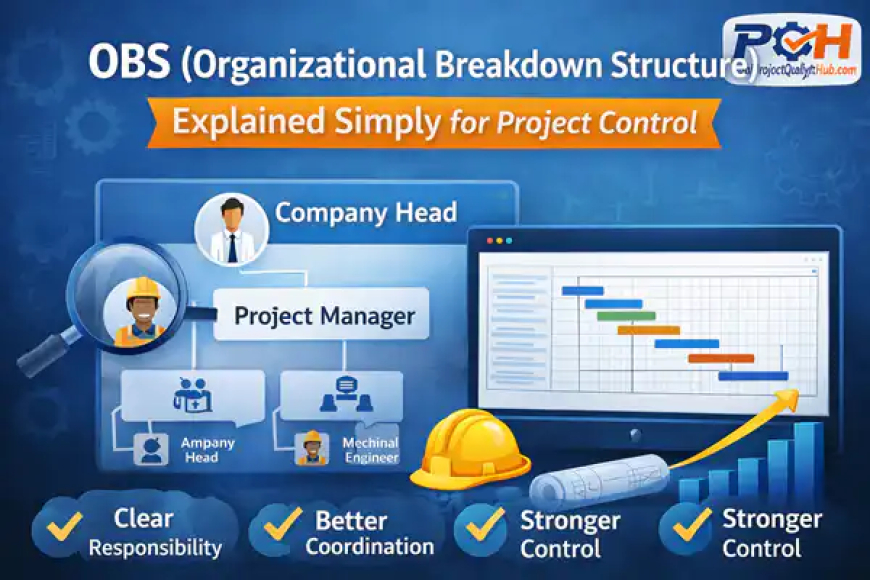
OBS defines levels like:
-
Company Head
-
Project Manager
-
Site Engineer
2. Role-Based Assignment
Each level has defined roles.
👉 Example:
-
Planner → Scheduling
-
Engineer → Execution
-
Manager → Monitoring
3. Integration with EPS & WBS
OBS is linked with EPS to assign responsibility at project level.
4. Access Control
OBS helps in defining:
-
Who can view
-
Who can edit
-
Who can control project data
Practical Example (Real Project Scenario)
Let’s take a steel plant installation project.
Project Structure:
-
Civil Work
-
Mechanical Work
-
Electrical Work
OBS Assignment:
-
Project Manager → Overall project
-
Civil Engineer → Civil activities
-
Mechanical Engineer → Equipment erection
-
Electrical Engineer → Cabling
👉 Now if delay happens in mechanical work:
You instantly know → Mechanical Engineer is responsible
No confusion. No blame game.
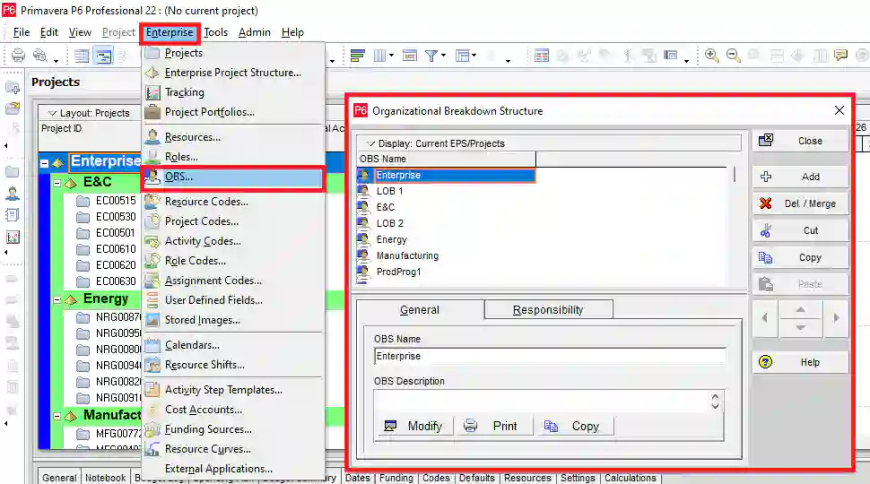
Step-by-Step: How to Create OBS in Primavera P6
Let’s keep it practical and easy.
Step 1: Open OBS Window
Go to → Enterprise → OBS
Step 2: Add OBS Nodes
Create levels like:
-
Company
-
Project Manager
-
Engineers
Step 3: Assign Responsible Manager
Link OBS to EPS/project
Step 4: Define Access Rights
Set permissions (view/edit/control)
Step 5: Save and Apply
Now OBS is ready for use.
Real-Life Case Study
In one EPC project:
-
Multiple contractors were working
-
Delays were frequent
-
Reporting was unclear
After implementing OBS:
✔ Each activity had a responsible person
✔ Meetings became focused
✔ Decision-making became faster
✔ Accountability improved significantly
👉 Result: Project control improved drastically
Advantages of OBS
✔ Clear responsibility assignment
✔ Better project control
✔ Faster decision-making
✔ Improved communication
✔ Reduced conflicts
Disadvantages of OBS
❌ Requires proper planning
❌ Needs coordination with team
❌ Misalignment can create confusion
Common Mistakes Beginners Make
1. Ignoring OBS completely
Many planners skip it → big mistake
2. Assigning wrong roles
Incorrect responsibility leads to confusion
3. Overcomplicating structure
Too many levels = difficult management
4. Not linking with EPS
OBS must be connected with projects
Expert Tips (From Real Experience)
👉 Keep OBS simple and practical
👉 Match OBS with real organization structure
👉 Always assign a responsible manager
👉 Review OBS before starting project
👉 Update OBS when team changes
Conclusion
So, what is OBS (Organizational Breakdown Structure)?
It is the backbone of responsibility management in any project.
Without OBS:
❌ No ownership
❌ No accountability
❌ No clarity
With OBS:
✔ Clear roles
✔ Better coordination
✔ Strong project control
👉 In simple words:
WBS tells what to do, OBS tells who will do it.
If you want to become a strong project planner, never ignore OBS.
FAQs
1. What is OBS in project management?
OBS is a structure that defines roles and responsibilities within a project.
2. What is OBS in Primavera P6?
It is used to assign responsible managers and control access to projects.
3. What is the difference between OBS and WBS?
WBS defines work, while OBS defines responsibility.
4. Why is OBS important?
It ensures accountability and improves project control.
5. Can OBS be changed during a project?
Yes, but changes should be controlled and documented.
Related Articles
- What is Primavera P6? Complete Guide for Beginners
- How to Download Primavera P6 for Free in 2026 (Step-by-Step Guide for Engineers & Students)
- PMP Certification Guide: Benefits, Eligibility & Exam
- Primavera P6 Index Explained for Beginners
- EPS (Enterprise Project Structure) in Primavera P6 Explained Simply